
How do I focus Listings by size, age, and/or pack?
TL;DR. You decide which sizes, vintages, and packs a Listing shows. Open the Listing, click Edit rules and see coverage, and select only the formats you want, for example 750 ml. Shoppers then see one clean set of options instead of a jumble of formats and prices. One thing to know going in: the narrower the filter, the fewer retailers carry it, so check the coverage view before you commit.
What focusing a Listing does
The same wine or spirit often lives in your catalog in several formats: 750 ml, 1.5 L, 375 ml, magnums, plus multiple vintages. Left wide open, a single Listing can surface all of them at once, so a shopper sees one store's 1.5 L price sitting right next to another store's 375 ml price. Focusing a Listing lets you constrain it to just the formats you want shoppers to see, so every Listing points at the exact product you want them to buy.
Why a focused Listing sells better
A confused shopper is a shopper who doesn't buy. When sizes and prices don't line up, people hesitate, and hesitation is where the sale leaks out. Pour Now's whole job is to turn your marketing into a purchase, so a Listing should give shoppers one clear product at a price that makes sense, not a puzzle to solve.
*Coming soon, shoppers will be able to filter by size, vintage, and pack themselves, right in the Listing. Until then, focusing on your end is what keeps results clean.
Focus a Listing to the formats you want
- Open the Listing you want to clean up.
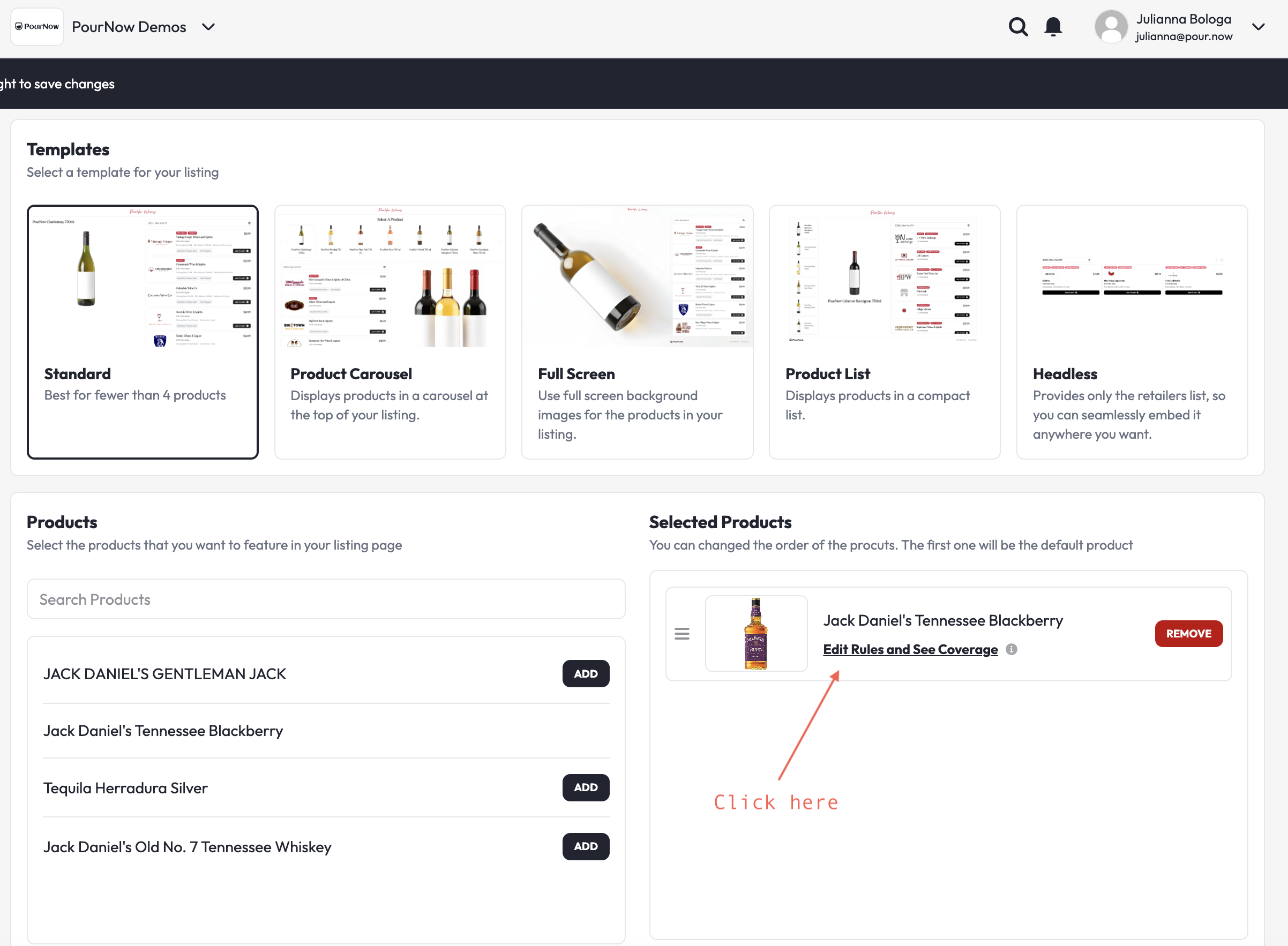
- Click Edit rules and see coverage on each of the selected products
- Under size, age, and format, check only the formats you want shoppers to see, for example, 750 ml.
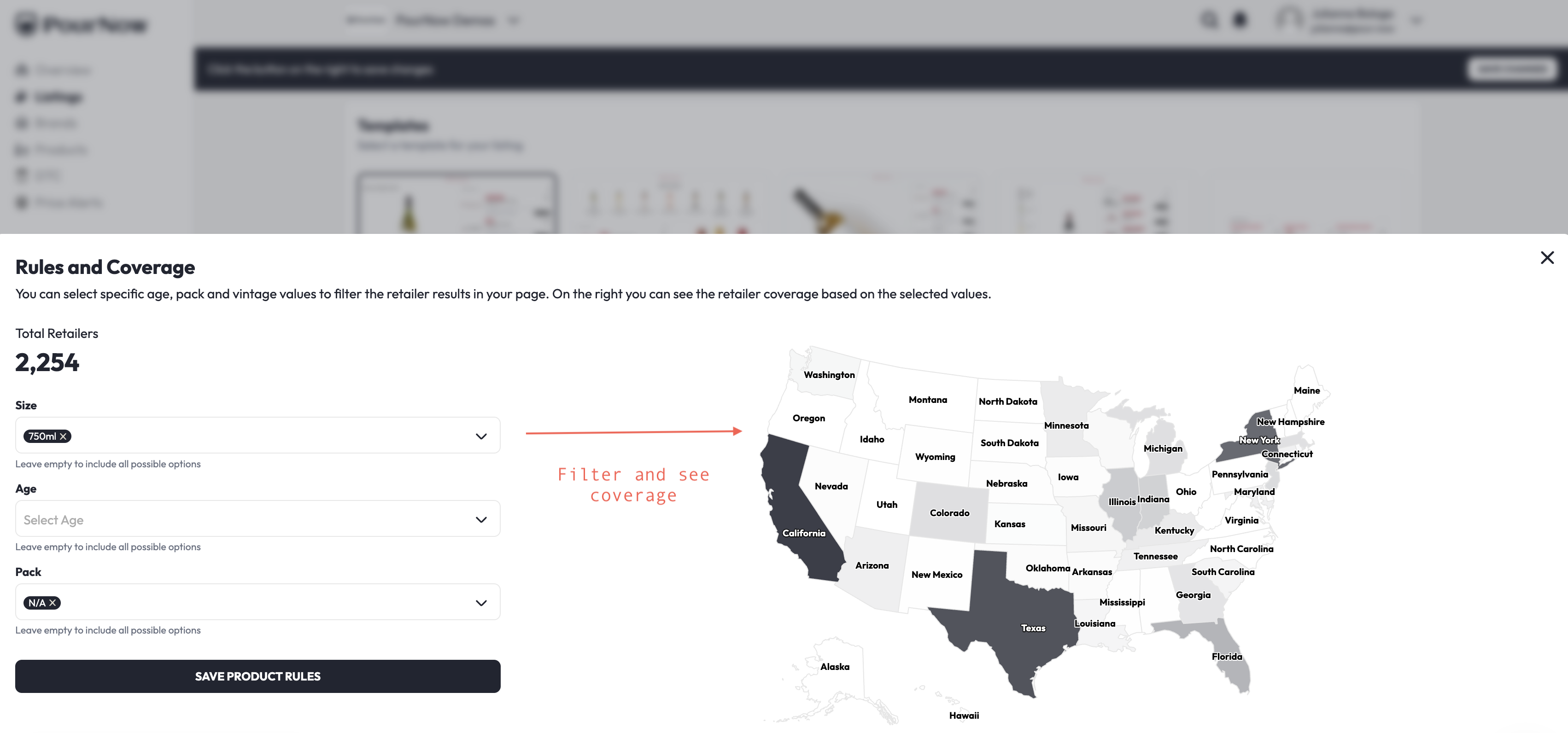
- Check the coverage view so you know what you're working with. This step matters more than it looks (see the trade-off below).
A trade-off to expect: filtering narrows coverage by design. The more specific your filter, the fewer retailers qualify, because not every store carries every format. A vintage is the clearest example. Almost any retailer might carry the wine, but only some carry the 2019 specifically, so filtering to a single vintage can sharply shrink your retailer pool. That is not a bug. It is the Listing doing exactly what you asked. The habit that keeps you safe is simple: check the coverage view every time before you build spend around a narrow filter, so you know how much reach you're trading for precision.
This same screen is where you run a more pointed play. Want to move a specific vintage to clear at-risk or older-label inventory? Check just that vintage. Running a seasonal campaign? Brands have focused Listing on 375 ml for wedding planners and on magnums for party season. The format you check is the format you feature, with the coverage trade-off above in mind.
How to know it worked (and what to do if it didn't)
When it's working: your Listing shows only the formats you selected, so a shopper sees one clean set of options at prices that line up, each pointing to a live, in-stock product they can actually buy.
If something's off:
- An unwanted size is still showing: confirm you saved, and that the format is unchecked everywhere it could apply (check each market or rule set tied to the Listing).
- Coverage dropped after filtering: this is expected, not a fault. The narrower the filter, the fewer retailers qualify, and a single vintage narrows it the most. If you've traded away more reach than the campaign can afford, add back a format or vintage, or loosen the rule.
- Results look thin or empty: the format or vintage you focused on may have very limited retailer coverage to begin with. Check the coverage view before you launch, so you're not pointing spend at something only a handful of stores carry.
Need a hand?
Ask Pour, the assistant in your dashboard, or email help@pour.now. We'll help you focus the Listing or plan a format-specific campaign.